My agentic coding workflow in March, 2026
After years as an AI skeptic, it’s my turn to admit I was wrong. Just half a year ago, LLMs would waste more of my time than they would save me. Today, I can write an entire SwiftUI app with zero human intervention at the code level (and I do). So for me, that means it’s time to embrace this as the future of coding, learn the tools, and get empowered instead of complaining.
What level of LLM written code versus manual written code is correct for a stable code base, or the ethicality of using AI in development… these are not the questions I’m here to answer today. This blog post is about what I’ve learned in the past few weeks, and the workflow that I’ve set up to maximize my productivity, both at work and for hobby projects.
AI coding moves at the speed of light, but much of the below should still be solid advice for quite a while. One thing I really enjoy about agentic coding is that gives us one more reason to do pedantically good and correct coding: we’re forced to write documentation, to comment our code, to write unit tests, and to automate processes, just to reap the real benefits of AI. This is great for people and agents alike!
Workflow setup
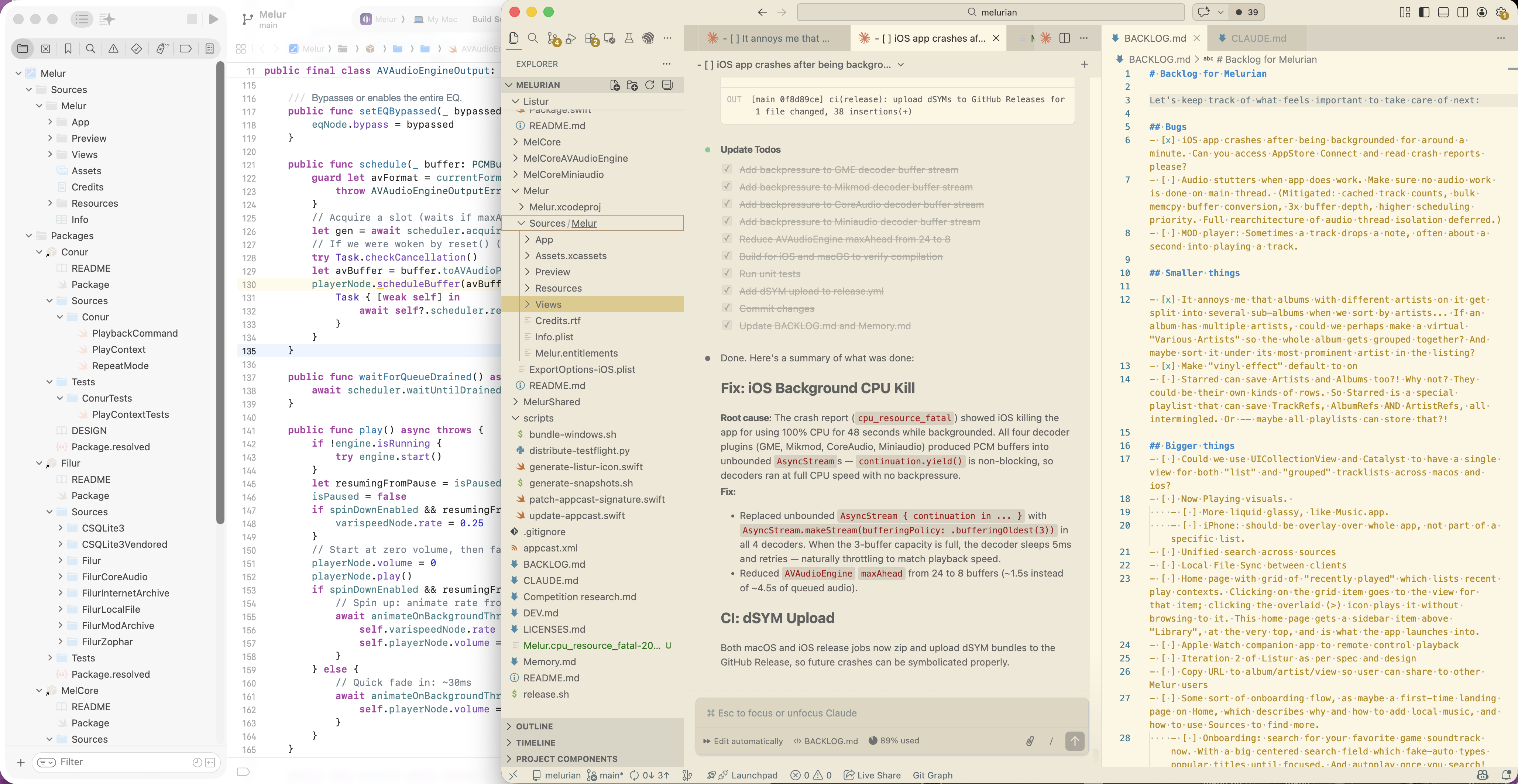
My general workflow (as seen in the screenshot above) is Visual Studio Code with the Claude extension, and a Claude Max subscription, and Xcode on the side if needed. For my dayjob, I use Xcode with Codex on the side.
For projects that are mostly vibe coded (i.e., I let Claude do almost all the coding, and I only code if I really have to), I like having the agent conversation front and center as the main tab, and context for the agent on the right. In Vscode, you get this by clicking the orange * icon in the toolbar, instead of using the agent sidebar.
I vastly prefer to have a GUI tool for my agents. I don’t quite understand why people run agents as CLI TUIs instead of dedicated apps or vscode extensions. In a GUI app, plan files render with proper markdown headings, inline images, graphs; and it’s easier to tell chat messages from code diffs, and navigating between agent sessions, and… Yeah. If you’re undecided, I strongly recommend a GUI tool like a VSCode extension, or Cursor or similar.
To help agents with context for their work, I maintain README.md, AGENTS.md, BACKLOG.md and MEMORY.md in each of my projects. Read more about them below.
A typical session for a vibe coded session
Before I dive into specifics, I’ll just run you through a typical session, to give you a feel for how I work. Then I’ll explain my rationale for each. So, when I decide to go from an idea to a project…
First, I’ll create a new Git repo. I do nothing without Git. Just mkdir myproject; cd myproject; git init; code .. Even for people with no coding experience, I recommend learning the basics of git and basing their work on top of that.
Next, I’ll describe the vision for the project as much as I can in a README.md. I could put this as the first message in a chat session, but then I’d have to repeat it in the next session. Much better to have it in the repo.
If my vision is too grand, I’ll add a docs folder and add a bunch of Markdown files and screenshots and drawings to explain it in as much detail as possible.
I’ll then draft an AGENTS.md with my rules for how to work together effectively. This includes atomic commits, continuously working with a MEMORY.md, and building and testing.
I’ve probably already configured whatever MCP and tool access is needed to enable it to then follow those rules.
I’ll probably fire up a chat session next, asking it to first critique my plan; and then ask it to establish the skeleton for this project. In this session, we’ll probably flesh out a few first basic features.
After a while, I’ll have too many todo’s in my head, things I want to have it build. So I’ll add a BACKLOG.md, as a very lightweight tool for keeping track of upcoming tasks.
Then I can prompt it to keep building features from backlog, stopping every few features to test them out and keep it honest and check stability; or interject with specific todo’s that I’m more keen on in the moment.
For anything that is big, I’ll either ask it to make a plan, or it will make a plan from its own volition. This is your time to shine, and really check for any holes in its idea of how to implement things, or for context or future ideas that you have in your head and never properly communicated. Auto-accepting plans without reading through and directing is the surest way to end up with an unreadable spaghetti code base.
After a while, the project becomes beta release ready, and I’ll have it configure CI and a release process, so we can get server deployments and/or binary downloads ready for the user.
I’ll probably also make a marketing website and get that published on Github Pages.
And iterate! From here, we can go forever, with however many features and improvements as we want.
Main learnings
Okay, half of that might’ve gone over your head, unless you’re already deep in the agentic coding space. Let’s dive into the practicalities of this workflow.
I used to just write in the ChatGPT app and copy-paste back into Xcode. I’ve come a long way since. In that journey, some fundamentals I’ve established are outlined below.
Provide the agent with ways to test its own work.
Avoid roundtrips to you as a user. Any time you have to answer “is this correct/done?”, you’ve wasted time on back-and-forths that could’ve been spent better elsewhere.
Enable the agent compile on its own so it can fix all compile errors. In a strongly typed language like Swift, in a good code base, code that compiles is generally correct code. This will save you SO much time.
(Note that this implies: don’t use weakly typed languages with LLMs. The agent has no way to validate the correctness of its code without running it and noticing the runtime errors. For some code paths, that’s almost impossible without a real life usage scenario, so your code will start to get riddled with unchecked bugs.)
Enable the agent to generate screenshots and look at the visual results of its coding so it can fix things without your intervention. Instead of doing five roundtrips of you sending it screenshots, it can give itself the feedback it needs.
For Xcode, this means: give it access to xcodebuild, or build through Xcode MCP. Xcode MCP also gives it access to #Preview, so it can look at the result of its code.
You can give Claude access to your Xcode with claude mcp add --transport stdio xcode -- xcrun mcpbridge.
For other environments, you can ask it to implement snapshotting/screenshotting, so that it can launch your app/website/whatever and check its work.
Session memory, managing context length, and AGENTS.md
Sessions have rather limited memory, often around 250k tokens (about a million characters). A long conversation, and reading a lot of your local source code, will exhaust this space. Claude can then compact your conversation (which means, write a summary of everything, and use this summary instead of the whole conversation as input to the next message); or you can create a new session.
In both cases, it will forget important details. It can then either do the research again, or you can help seed it with important context.
AGENTS.md (or with Claude, CLAUDE.md) is just a text file with rules and context information. Some use it as a tool mostly to describe the structure of your code: I think this is wrong. Put only the most important architecture rules in AGENTS.md, and put the rest in real documentation files (in docs/, or alongside code). Architecture and design information applies equally to agents and humans, so write it for both.
Instead, use AGENTS to describe rules and workflows. Here’s what a typical AGENTS.md looks like for me:
## RULES (always follow, never skip)
- All errors must be caught and forwarded so they can be surfaced in the UI.
- Always make atomic commits with detailed commit messages after each completed subtask. Do staging and committing as separate tasks so I don't have to approve the commands.
- Check off todo items in BACKLOG.md and put them into Completed at the bottom of the document. Include this change in the commit.
- Write unit tests when it makes sense. Especially when you fix a bug, see if you can write a unit test to make sure it doesn't happen again.
- Make #Previews for all the important views. Use these through MCP when making views, both previewing mac and iPhone, so you know if it will look good.
- Always build with xcodebuild to make sure things compile. Use Xcode MCP when available and needed (to run, make snapshots, look at SwiftUI previews, etc). Always verify that the app builds for iOS and MacOS, and at the end of each plan, also run all unit tests with xcodebuild.
- Keep a Memory.md as a memory for you between sessions. Keep it under 100 lines. Focus on things you can't easily rediscover from code: architecture overview, build commands, non-obvious pitfalls/gotchas (where you'd waste time if you forgot), test infrastructure quirks, and user preferences. Don't document settled features in detail (library system, navigation, cover art, etc.) — you can read the code for those. Update with each commit.
- At the start of every new task, re-read claude.md and memory.md.

More details follow, but keep the above always in memory with highest priority.

## Git Workflow

* **Atomic commits per logical change.** Each distinct feature, fix, or refactor gets its own commit — do not bundle unrelated changes together.
* **Detailed commit messages.** The subject line names the module in parentheses and describes *what* changed. The body explains *why* and *how*: what the key design decisions were, what invariants are maintained, and what other files were deliberately left unchanged.
* **Check off completed backlog items.** When a commit completes a BACKLOG.md item, include the checkbox update (`- [x]`) in the same commit, and move the item to the top of the "# Completed" section"


## Error Handling: Fail Fast and Early

...

## Architecture Boundaries

...

## Testing

...  and so on. you get the point.
Let’s call out the most important bits here:
- At the top of AGENTS.md, I try to succinctly keep the most important rules in one place. Even if this whole file is long, LLMs will prioritize information in the beginning, especially if you tell it something is important.
- I’ve asked Claude to keep a MEMORY.md. This lets it record its most important discoveries in a place it can re-reference. I feel like this improves the time it takes the agent to re-acquire context, but I have no data on that.
- I’ve heard other people use things like: an sqlite database! to store an infinite amount of learnings. Or, store a LOT more info in markdown files and use something like qmd to query this massive information store. I haven’t tried either of these approaches.
- Atomic commits. This is huge, and I’ll expand on this below.
- Unit testing. I have specific preferences for how to unit test, so I ask it to work like that to make sure that the agent doesn’t break functionality as it adds more features.
- Other code base hygiene factors. If you are using open source dependencies, some require you to mention them and their license from within your app. This is the kind of rule that goes perfectly in AGENTS, to make sure your agent remembers to add new licenses to this list.
- This is also a good place to document un-obvious things. Some design decisions might be counter-intuitive, and rather than have every agent session think it’s a bug, document it in AGENTS.
Atomic commits
I love Git. It can be a menace, but it is an incredibly helpful tool to work with changes to code.
By asking Claude to always make commits as it goes, as atomic, fully functional commits, I can always just roll back a commit if I disagree with the direction. Or with almost minimal effort revert a commit from history if I changed my mind.
By asking Claude to always write almost over-verbose commit messages, explaining the rationale behind the change, I can always git blame a line to know exactly why that line exists, and why it wasn’t written another way. And importantly, future agents can know this too.
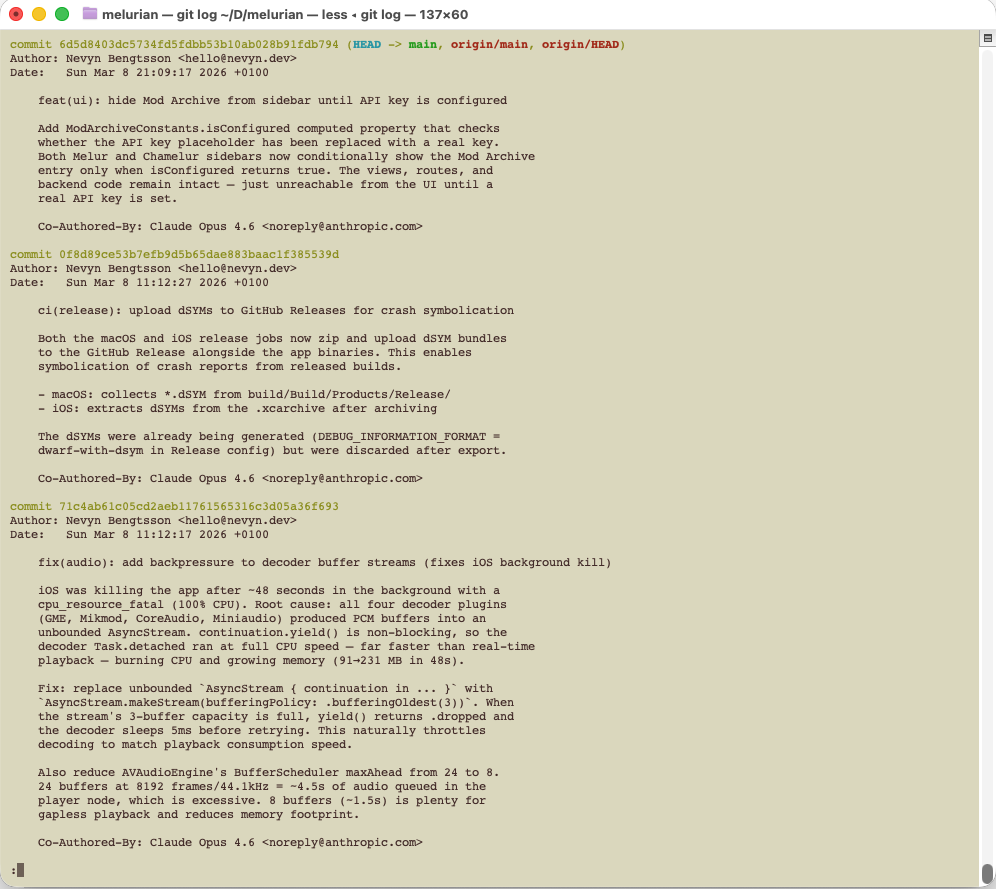
I prefer both of these rules when I work with humans too, but agents are much better at adhering to them.
I ran into this benefit just a few minutes ago. I ran into a code signing issue with a Mac app — a well known finnicky concept that often breaks, and it’s hard to remember exactly the steps one took to fix it last time, as you likely tested a dozen different solutions. I could just ask the agent to look at git history, and not only could it find WHAT it should do to fix it again, it could understand WHY, and tell me!
Working with a backlog: you are now a manager.
If you’ve ever project lead something, you know how important it is to have a roadmap, and vision for where you’re going. This is true for your vibe coded project too. Just mashing out whatever feature comes to mind is fine up until a point, but eventually you’ll run into your project being a tangled mess — and I’m not just talking about code quality, but product quality. You need to have a vision and a road there to make something good.
We COULD set up a JIRA or other project management tool, but… Since everything else is a markdown file in this agentic world, why not the backlog too?
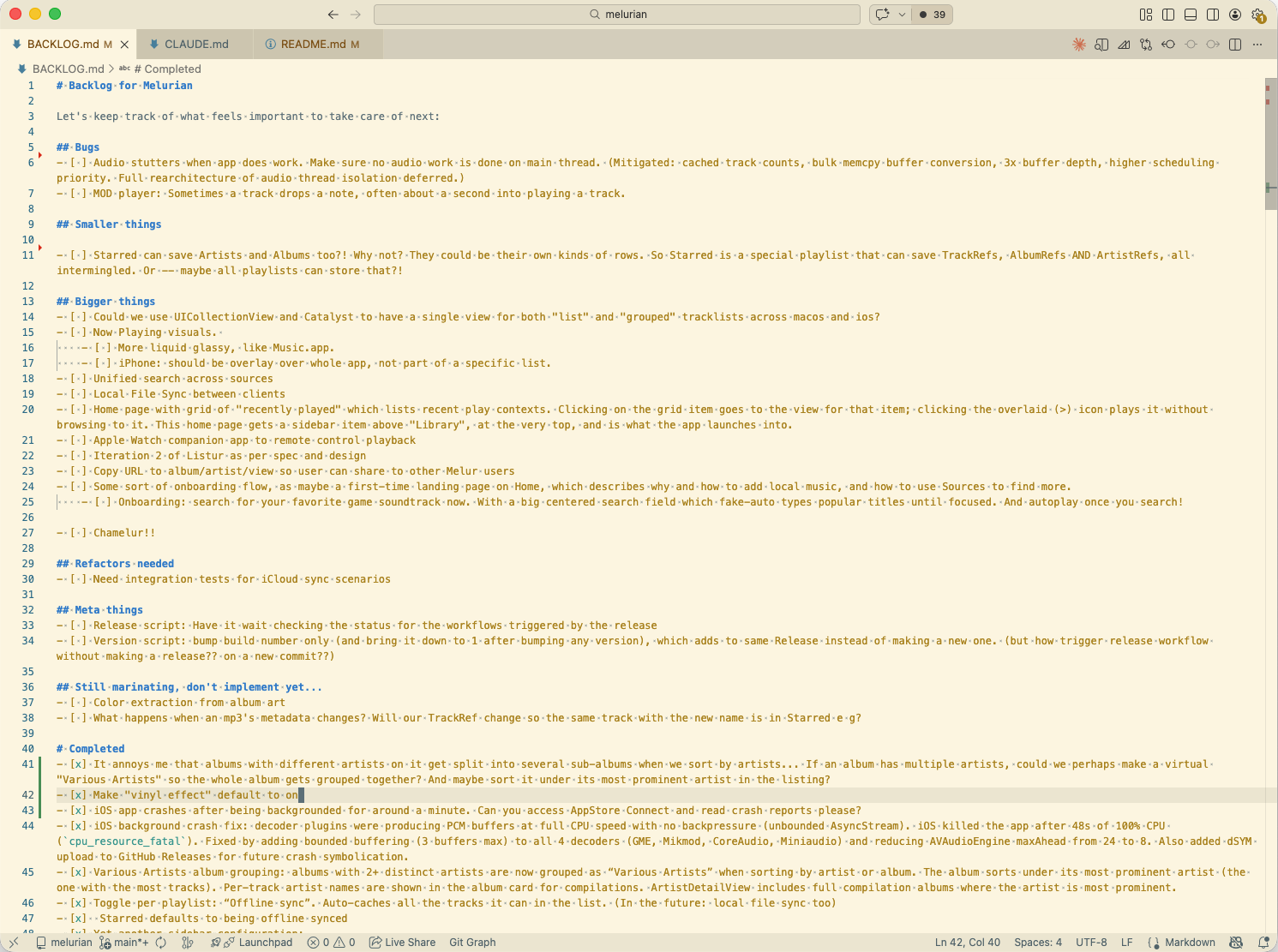
I really like having the “Completed” section. That way, we have a log of all our requests, which can give us perspective on what we’ve built, and also give agents more context.
But, I have also had success integrating Claude with Notion, through MCP! MCP is a standardized protocol for connecting agents to tools, both local and remote. By letting my agent talk to Notion, where I have my backlog, I can have it pick up tasks, read more from product design specifications, sketches and what else I have up there, write the code, make a PR and attach it to the card, and move the card to “in review”, all without my interaction.
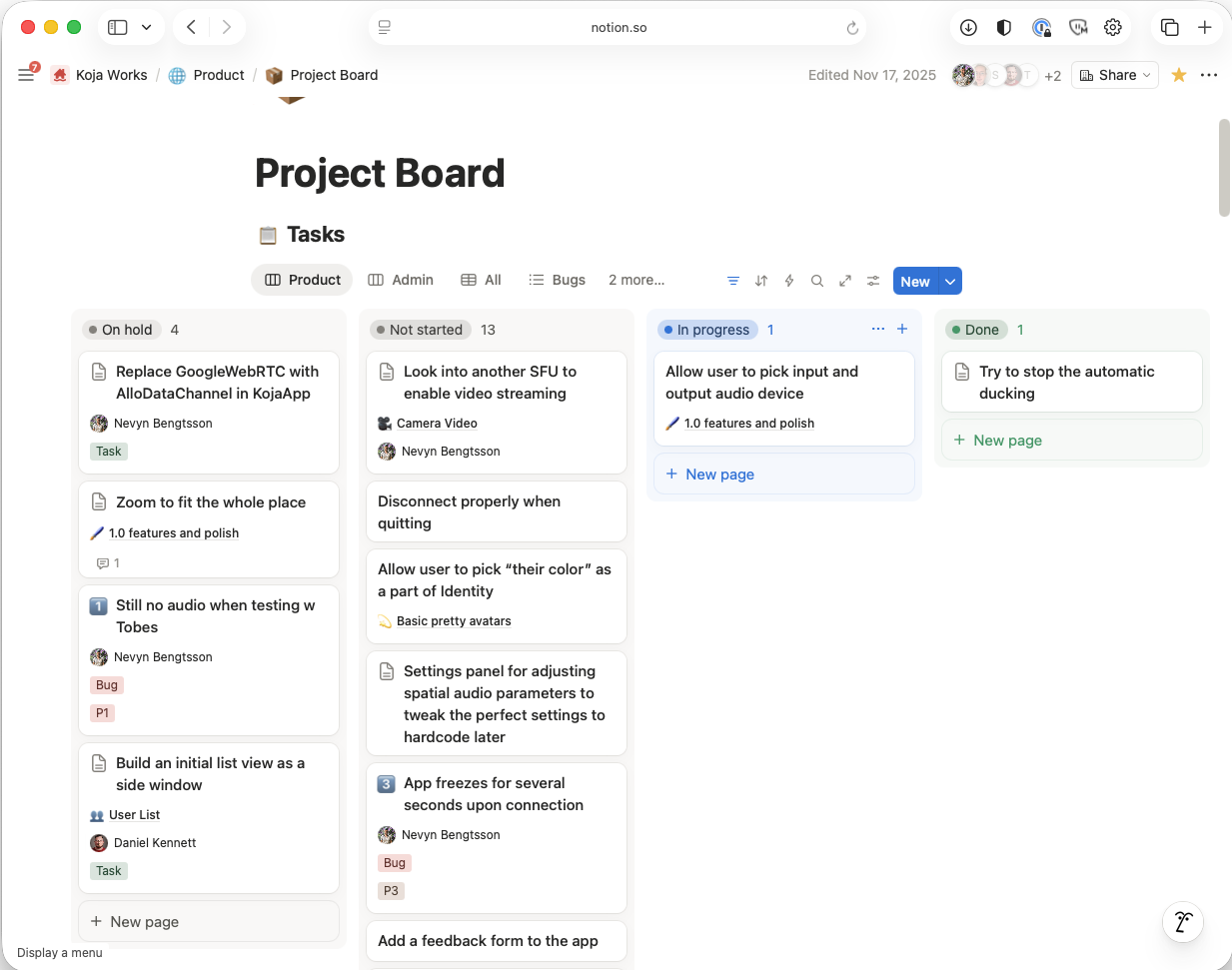
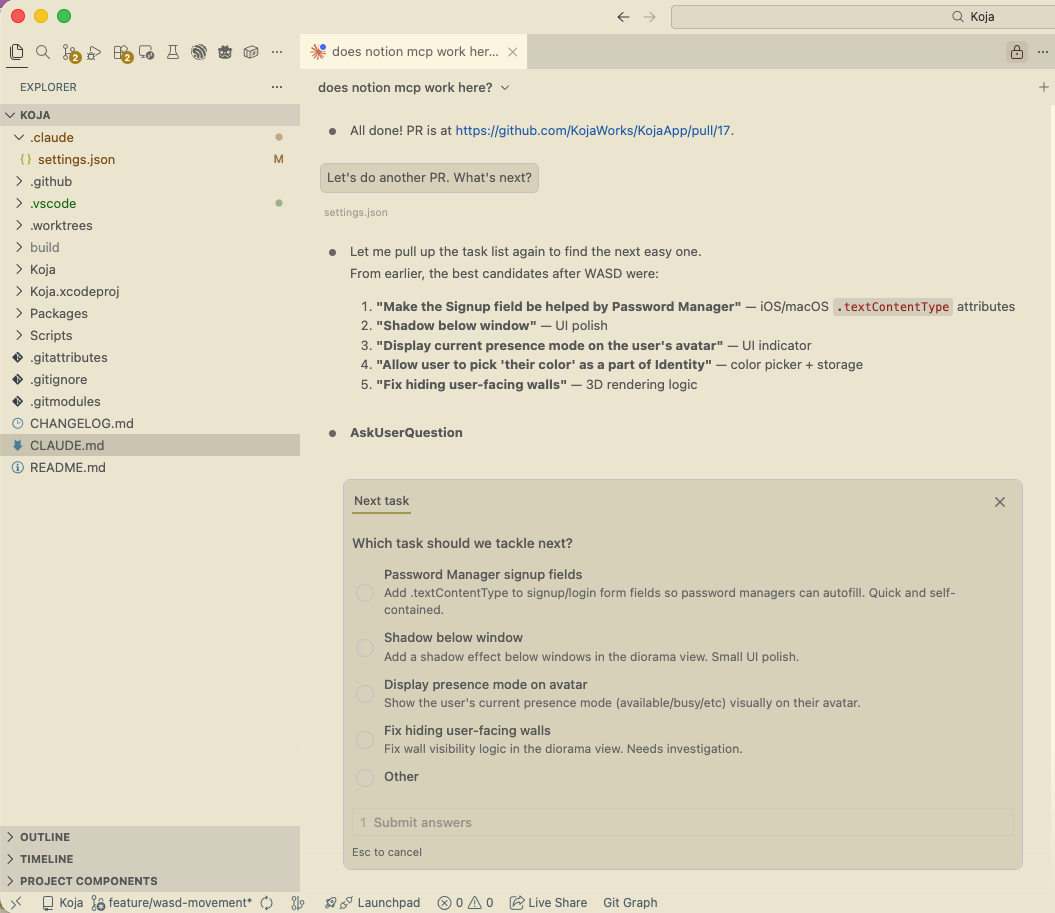
Regardless, take this to heart: if you are to vibe code successfully, you are practically becoming an engineering manager. You steer direction from a vision, and you course correct the agent if it ever veers off that path, or goes down a bad coding decision that will lead to a nightmare code base further down. This is where your years of programming experience can really show its use in this age of agentic coding.
Working with CLI tools
For some services, I had real trouble setting up MCP. It would be buggy, hard to authenticate, or just wouldn’t work.
Then I realized, Claude can just use command line tools, and learn to use these tools by reading their documentation. So instead of adding MCP, I could just install and configure tools for pretty much anything! And it works so great.
- I use
ghto have Claude submit pull requests, create releases, rename projects, configure Github Pages, you name it. - I use
glabto have Codex do the same things with GitLab, including making Merge Requests, adding appropriate colleagues to review the feature, and summarizing my changes - I use
ascto have Claude download crash reports from App Store Connect, enable TestFlight releases, submit translated metadata for appstore listings, etc
Have scripts invoke Claude
One really neat hack is a release.sh script I had Claude code for me, which creates a new GitHub release, which triggers CI to build a release of my app, and then uploads the app’s zip to said release.
This script also writes the changelog and attaches it to the release using claude -p! So Claude wrote this script that uses Claude to write release notes. Meta! It took a while to tweak the prompt, so here it is for your perusal:
if command -v claude &>/dev/null && [[ -n "$LAST_TAG" ]]; then
    echo "Generating release notes with Claude (changes since ${LAST_TAG})…"
    echo ""

    # Feed Claude both the commit log and the Swift diff so it has full context
    # even when commit messages are terse.
    COMMIT_LOG="$(git log "${LAST_TAG}..HEAD" --format='%s%n%b' -- 2>/dev/null || true)"
    SWIFT_DIFF="$(git diff "${LAST_TAG}..HEAD" -- '*.swift' 2>/dev/null || true)"

    NOTES="$(cat <<EOF | claude -p --output-format text 2>/dev/null || true
You are writing release notes for Melur, a music player app for macOS (and iOS).
Below are the git commits and Swift code changes since the last release (v${CURRENT_VERSION}).
Write a short, friendly release notes body (2–5 bullet points) describing user-facing changes.
Omit version-bump commits and internal/CI plumbing. Use plain markdown bullet points, no header.
You are running non-interactive, so go ahead and decide on your own if you become indecisive
about anything.

Your response is directly piped to the gh tool, so IT IS VERY IMPORTANT that you do not say
any commentary, notes or disclaimers. ONLY say the bullet points for the release notes in
response to this prompt.

## Commits
${COMMIT_LOG}

## Swift diff
${SWIFT_DIFF}
EOF
)"
Claude permissions
One of my agents.md rules is, “do staging and committing as separate tasks so I don’t have to approve the commands”. This is because when a command contains ”&&”, Claude just assumes that it is too tricky to whitelist in settings.json and prompts the user to approve it.
A session can be tens or hundreds of cli commands, and anytime you have to babysit prompts that aren’t actually dangerous, you’re wasting time and attention. Use AGENTS.md prompts like the above to make it easier to whitelist commands to trust, and then curate your .claude/settings.json thoroughly to make it safe AND productive. Here’s a snippet from one of my configs:
{
  "permissions": {
    "allow": [
      "Bash(find *)",
      "Bash(swiftc *)",
      "Bash(git -C /Users/nevyn/Dev/melurian *)",
      "WebFetch(domain:github.com)",
      "WebFetch(domain:raw.githubusercontent.com)",
      "Bash(xcodebuild *)",
      "Bash(xcrun swift *)",
      "Bash(curl *)",
      "WebFetch",
      "WebSearch",
      "mcp__xcode__XcodeListWindows",
      "mcp__xcode__BuildProject",
      "mcp__xcode__XcodeLS",
      "mcp__xcode__XcodeRead",
      "mcp__xcode__XcodeWrite",
      "Bash(gh run *)",
    ],
  }
}
When the agent fails
Even if you carefully manage PLAN files, fill out backlogs, and write architecture specs, sometimes the agent will fail to perform your task, or just do a bad job of it.
My general approach is: if the agent gets stuck for more than 2-3 iterations, take the wheel. You need to be able to step in and fix it, and no matter what you prompt, it will just make the mess worse. You have reached the edge of its capability, and even if it feels like it’s almost getting it, you won’t get there.
This is also where those atomic commits pay off — just revert or git reset --hard HEAD~3 to remove the last few commits and try a different approach, or a fresh session.
How much should you review code, to notice that things go wrong? That depends on the importance of the result. If you’re building a hobby project for the fun of it, mostly only reviewing plans carefully and never reading the code actually works fine, up to tens of thousands of lines of code.
For work where I get paid for writing software, I audit every line and make sure I understand what’s going on. If I don’t, I ask the agent to reiterate until I’m both pleased with the quality, and understand exactly what’s going on. Some say this is overkill; I say it is a necessity to not lose control of your software stack.
Future agentic coding wish list
My biggest wishlist is to be able to have my agents continue working when I put my laptop to sleep. Preferably, agents would auto-migrate between my computer and cloud containers as needed, and never be entirely bound to my machine. Compilation tool access, and Github automation, and a few other MCP capable tools, should be able to run just as fine in a docker container in a cloud instance as on my machine. And I’d love to be able to choose freely and jump back and forth between directing my agent from vscode, the browser, or a mobile app on the go, regardless of how I started the session.
Claude Remote has the very beginnings of this, but it’s very rough and CLI only at the moment.
I also know some people use multiple collaborating agents to fill many different roles. I’d love to learn more about this, but haven’t had time to research it yet.
Thank you
If you’ve read this far, thank you for following along! Please reach out to me at my socials or hello@nevyn.dev if you have thoughts or questions.
This blog post was written 99.9% by hand, and proofread by Claude.
Addendum, 2026-03-10
There is so much more to say on this topic. Things that have come to mind after posting are:
- Git worktrees are great. You do need to have a solid grasp of Git first, though, but the general idea is: Create one more working copy of the current repo, but use the same .git folder for it. This’ll save you on storage and processing, and more importantly, you can very easily merge branches between working trees without even pushing stuff. I put
.worktreesin my user .gitignore, so that I can ask my agent to create a worktree for each parallell agent I have running. I would never let multiple agents loose on a single working copy. Use work trees! Codex even has them built in! - I’m fairly new at agentic coding. If you want more perspectives, I have really enjoyed:
- The inimitable Rui Carmo’s So You Want To Do Agentic Development. I’ve read Carmo for decades, and he has really gone deep on agents. He has some similar learnings as me, but also goes way deeper.
- Steve Troughton-Smith is a maker beyond compare, and he has gone very deep on building Mac, iOS and Android apps with Codex, in particular for bringing old code bases to life, or porting a code base to another platform with barely any work. He recently posted his workflow on Mastodon, and I recommend you dig in.
comments